Almost every nonprofit now uses AI. Very few get much out of it. A 2026 survey of 346 nonprofits by Virtuous and Fundraising.AI found that 92% use AI tools, but only 7% say it has made a major difference to what their team can do. Most use it alone and ad hoc: 81% individually, and only 4% with documented, repeatable workflows (Virtuous, 2026; NonProfit PRO, 2026).
The problem usually isn’t the tool. It’s that teams pick one chatbot and try to use it for everything, or chase every new app they see on LinkedIn.
This guide takes a different approach. Instead of ranking “the best AI tools”, it starts from the jobs communications and program teams actually do (writing, research, Arabic content, visuals, meetings and reporting) and recommends the right tool for each, with how to use it well. Every tool was chosen on four things that matter in our work: the quality of what it produces, how well it handles Arabic, how it treats your data, and whether there’s a free plan to start with.
Prices change often, so check each tool’s own pricing page before you buy. Prices below were checked in late 2026.
The toolkit at a glance
| Task | Tool | Free plan | Paid from | Arabic |
|---|---|---|---|---|
| Writing and editing | ChatGPT, Claude, Gemini or Copilot | Yes | About $20/month; cheaper tiers exist | Good MSA; dialect weaker |
| Research on your own documents | Gemini Notebook (formerly NotebookLM) | Yes | Extra features with Google AI Pro, $19.99/month | 80+ languages |
| Web research with sources | Perplexity | Yes | Enterprise Pro $40/seat/month | Not stated by vendor |
| Translation | DeepL | 50,000 characters/month | €7.49/month (annual) | MSA |
| Design and social graphics | Canva | Yes, or free Pro for eligible nonprofits | Pro, about $18/month | Arabic fonts and layouts |
| Video and podcast editing | Descript | Yes | $12/month (annual) | No Arabic transcription |
| Arabic transcription drafts | TurboScribe | 3 files/day | $20/month | MSA usable; dialect rough |
1. Writing and editing: pick one main AI assistant
Tools: ChatGPT, Claude, Gemini, or Microsoft Copilot if your organization runs on Microsoft 365.
All four can draft, edit, summarize and rewrite well. The bigger difference is where they fit. If your team lives in Google Docs and Gmail, Gemini is built in. If you’re on Microsoft 365, Copilot is. Otherwise, ChatGPT or Claude are strong general choices. Try two for a week on your real work and keep the one whose drafts you edit least.
What it costs: every one has a free plan. Individual paid plans are about $20 a month: Claude Pro is $20 monthly or $17 with annual billing (Claude), and Google AI Pro is $19.99 (AI Pricing Guru). Cheaper tiers exist too, such as Google AI Plus at $4.99. For a team, use a business plan: ChatGPT Business, for example, does not train on your content by default (OpenAI), and Claude Team starts at $20 per seat with annual billing.
How to use it well:
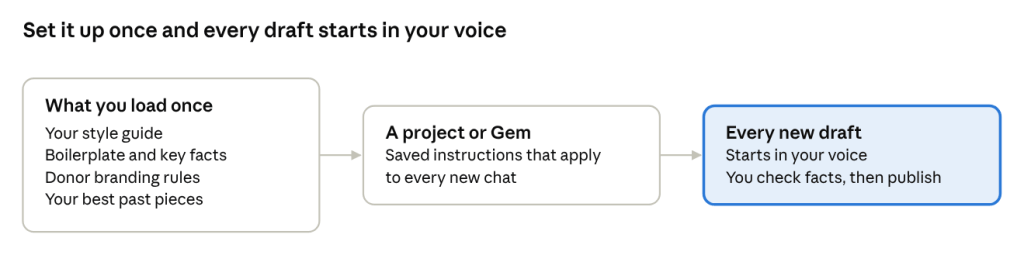
- Set it up once. Create a project (ChatGPT and Claude call them Projects; Gemini calls them Gems) and load your style guide, organization boilerplate, donor branding rules and two or three of your best past pieces. Every draft then starts in your voice.
- Feed it raw material, not a blank page. Paste your field notes, the report section or the interview transcript, and ask it to work from that. You get fewer generic sentences and fewer invented facts.
- Ask for options, then choose. “Give me three headlines” or “two versions: one for donors, one for social media” is faster than fixing a single weak draft.
- Use it as an editor, not just a writer. Paste your own draft and ask it to cut 30%, replace jargon with plain words and flag any claim that has no evidence behind it.
- Never publish the first draft. Check every fact, number, name and quote against your source.
2. Research and making sense of long reports
Tools: Gemini Notebook (formerly NotebookLM) for your own documents; Perplexity for researching the web.
Gemini Notebook is the most useful tool most communicators aren’t using yet. Google renamed NotebookLM to Gemini Notebook in July 2026; it’s the same product (Google). You upload your own sources (PDFs, websites, YouTube videos, audio files, Google Docs and Slides) and it answers questions from those sources only, with inline citations back to the exact passage. It can also turn them into briefings, study guides, mind maps and audio overviews, and it works in more than 80 languages (Google Help).
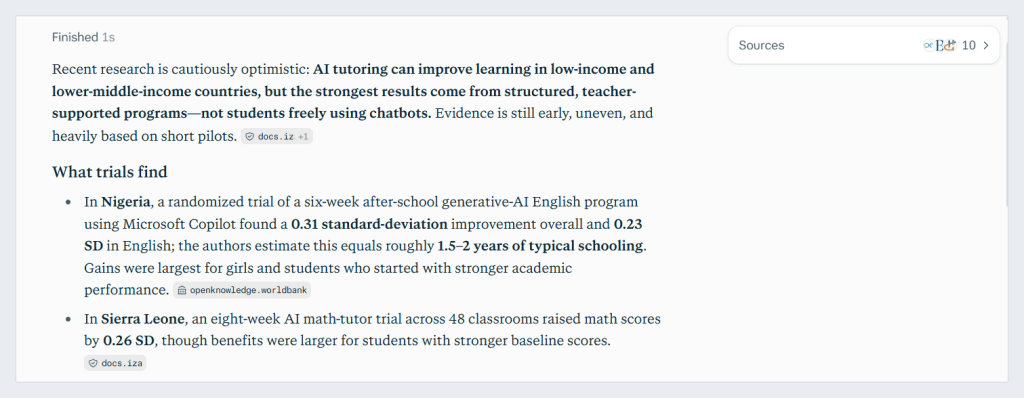
Perplexity is an AI search engine. Instead of ten blue links, you get a written answer with numbered sources you can click and check (Perplexity). There’s a free plan; Pro adds deeper searches and more advanced models.
How to use them well:
- Build one notebook per program. Load the program description, quarterly reports, evaluation, donor strategy and key press coverage. New team members can then ask “what did we achieve on women’s employment in year two?” and get a sourced answer in seconds.
- Prepare for meetings fast. Upload a donor’s latest strategy and annual report, then ask: “What are this donor’s three priorities, and where does our work fit?”
- Turn a 60-page evaluation into a briefing. Ask for a one-page summary for leadership, then a separate list of quotable findings with page numbers.
- Use Perplexity for the first pass on any topic. Then open and read the sources it cites. Quote the original report, never the AI summary.
- Watch for confident gaps. If a source doesn’t contain the answer, a good tool says so. If the answer has no citation, treat it as unverified.
3. Arabic content and translation
Tools: your main AI assistant for writing directly in Arabic; DeepL for fast, faithful translation of documents.
For teams in the region, this is where AI saves the most time and also goes wrong most often. The large AI assistants write good Modern Standard Arabic. Dialect is weaker. Research presented at ACL 2025 found that AI models understand dialectal Arabic better than they produce it, because they are “reluctant to generate” dialect (Robinson et al., 2025). A 2026 benchmark covering 13 Arab countries found the same pattern: models perform worse on dialect than on MSA, and translating into dialect is harder than translating into MSA (Al Kautsar et al., 2026).
DeepL added Arabic (MSA) in 2024 (DeepL). The free plan covers 50,000 characters a month; paid plans start at €7.49 a month with annual billing, and DeepL says paid users’ texts are deleted after translation (DeepL).
How to use them well:
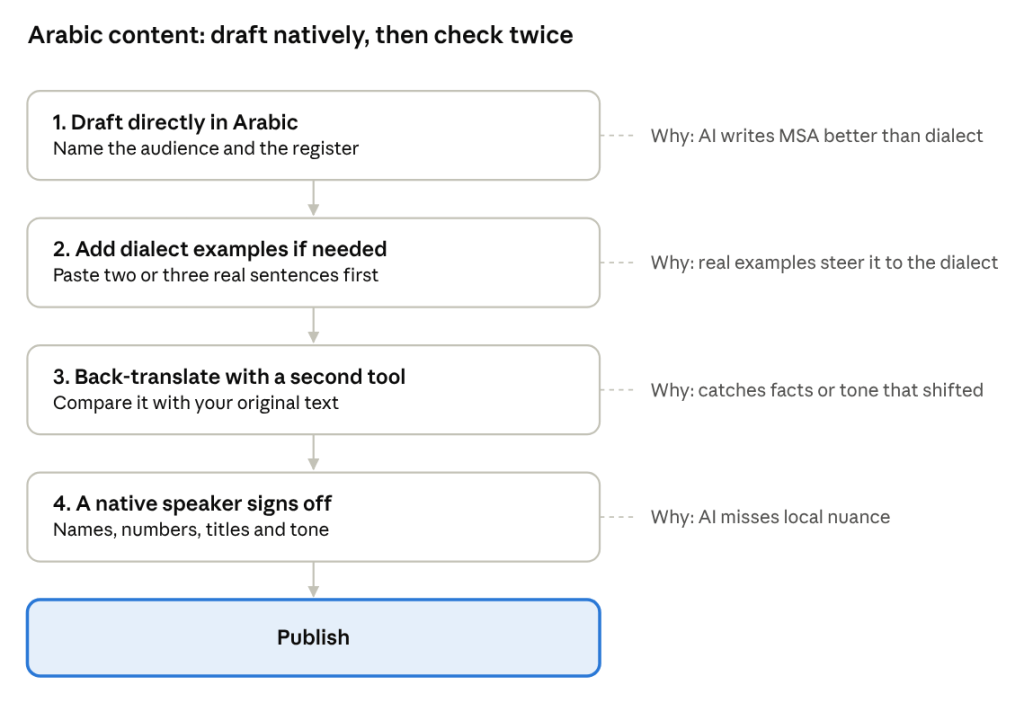
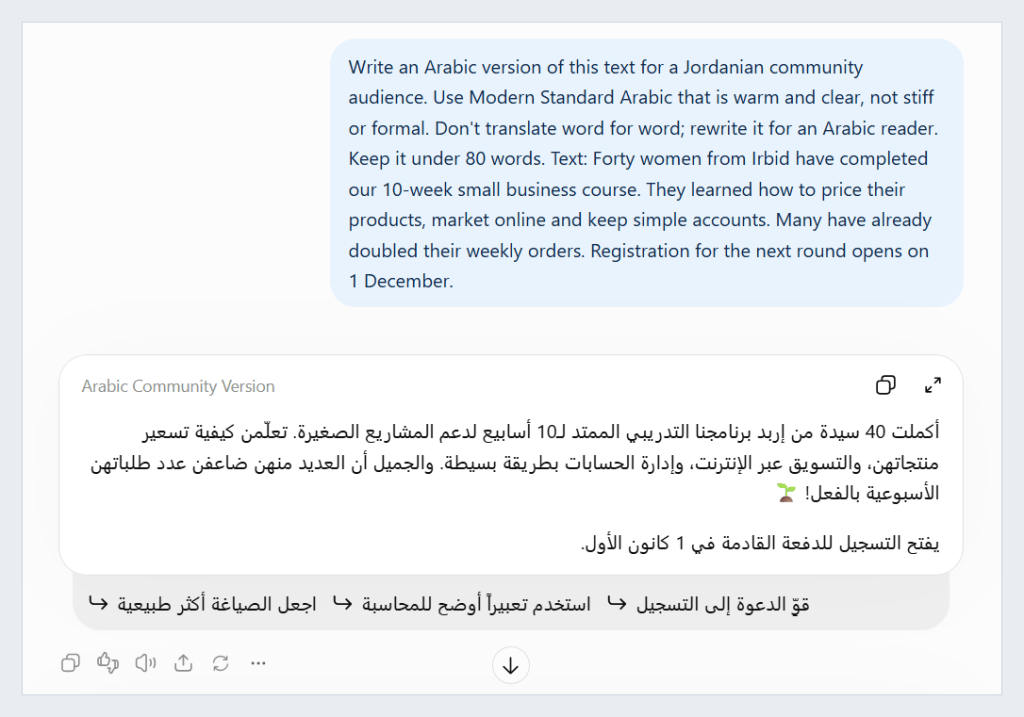
- Write in Arabic, don’t just translate. Ask the assistant to draft the Arabic version from the same notes, for the same audience. It reads far more naturally than a translated English text.
- Name the register. “MSA, warm and clear, for a Jordanian community audience, not a government report” gets a very different result from “translate to Arabic”.
- For dialect, give examples. The ACL study found that showing the model a few examples of the dialect you want improves its output. Paste two or three real sentences in Jordanian Arabic before you ask.
- Back-translate to check meaning. Ask a different tool to translate the Arabic back to English. If key facts or tone shift, fix them.
- A native speaker always signs off. Especially for anything public, sensitive, or with names, numbers and titles.
4. Visuals, video and design
Tools: Canva for designs and social graphics; Descript for editing video and podcasts by editing text.
Canva now has AI built into almost everything: generating designs from a prompt, resizing a post for every platform, removing backgrounds and drafting copy. The free plan includes 50 AI credits a month and Pro includes 500 (Piktochart, 2026). If you work for a registered nonprofit, check Canva for Nonprofits: eligible organizations get all Pro features free for a team of up to 50 people (Canva). Eligibility varies by country and Canva reviews each application (Canva).
Descript lets you edit a video by editing its transcript: delete a sentence from the text and it disappears from the video. It removes filler words and adds captions automatically. There’s a free plan, and Creator costs $12 a month with annual billing (Descript). One limitation for our region: Descript does not transcribe Arabic, so it works for English video only.
How to use them well:
- Build a brand kit first. Load your logo, colors, fonts (including an Arabic font that matches your English one) and donor logos into Canva, so every AI-generated design starts on-brand.
- Design once, resize everywhere. Make the master design for one format, then resize for LinkedIn, Instagram, X and a report page.
- Cut interviews in minutes. In Descript, read the transcript, delete what you don’t need, and export short clips with captions for social media.
- Never use AI images of “beneficiaries”. An AI-generated person presented as a real program participant misleads your audience and can breach donor rules. Use real, consented photos of real people, and keep AI imagery to illustrations and backgrounds.
5. Meetings, interviews and data
Tools: the meeting notes built into Teams, Google Meet or Zoom for English meetings; TurboScribe for Arabic audio; your main AI assistant for spreadsheets and survey data.
For English meetings, start with what you already pay for. Microsoft Teams, Google Meet and Zoom all offer AI meeting notes on their paid business plans, so you may not need another app.
For Arabic audio, be careful. Several popular transcription apps, including Otter.ai and Zoom’s built-in transcription, don’t support Arabic at all. A 2026 comparison found AI handles Modern Standard Arabic reasonably well, but estimated error rates of roughly 28% to 42% for Levantine dialect, which makes the output a rough draft at best. It recommends human transcription for dialect recordings you plan to quote or publish (VexaScribe, 2026; the publisher sells its own transcription tool). TurboScribe is a good low-cost option for drafts: 3 free files a day, or $20 a month for unlimited use (same source).
For data, ChatGPT, Claude and Gemini can all read a spreadsheet, summarize it and build charts. Gemini Notebook is adding the ability to analyze data directly from your notebook sources (Google).
How to use them well:
- Treat Arabic transcripts as drafts. Use AI to get a first version quickly, then have a native speaker check every quote before it goes into a story or report.
- Code open-ended survey answers. Paste 200 anonymized responses and ask: “Group these into themes, count each theme, and give two representative quotes for each.” Then spot-check the groupings yourself.
- Turn numbers into donor-ready tables. Ask for a results table against your targets, with a one-line plain-language note under each indicator.
- Anonymize before you upload. Remove names, phone numbers, ID numbers and anything else that identifies a person (see the ground rules below).
Ground rules before you start
The tools matter less than the habits around them. Nearly half of nonprofits still have no AI policy, and privacy and security are the top worry among regular users (NonProfit PRO, 2026). Six rules cover most of the risk:
- No personal data in free AI tools. Never paste names, phone numbers, ID numbers, case notes or anything that identifies a beneficiary into a free or personal account. Anonymize first.
- Use business plans for team work. Business tiers typically exclude your content from model training: ChatGPT Business does by default (OpenAI), Perplexity Enterprise states your data is never used for training (Perplexity), and DeepL deletes paid users’ texts after translation (DeepL).
- Check your donor’s rules. Some grant agreements set requirements for data handling, branding and disclosure. Read yours before using AI on donor-funded reports or materials.
- A person checks everything that goes out. Every fact, number, name and quote is verified against the original source before publishing.
- Real people, real photos, real words. No AI-generated images or invented quotes presented as real participants.
- Write it down. A one-page team policy (what’s allowed, what’s not and who to ask) prevents most problems. If you don’t know where your organization stands, my free AI Readiness Assessment is a five-minute starting point.
Prompt kit: 8 prompts for everyday comms work
These work in any of the main assistants. Replace the text in [brackets] with your own details.
1. Set up your assistant (paste into a project’s instructions)
You are a communications editor for [organization], which works on [sector] in [country]. Our audiences are [donors, government partners, communities]. Write in plain, warm, specific language. Avoid jargon such as "capacity building", "leverage" and "stakeholders". Never invent facts, numbers or quotes: if information is missing, ask me for it.2. Field notes to success story
Here are my field notes: [paste]. Write a 300-word success story for [donor] with: a headline, the person's situation before, what the program did, what changed (with a number), and one quote taken only from my notes. Then list the facts I still need to confirm.3. One message, four audiences
Turn this update into four versions: a two-line donor email, a LinkedIn post, an Arabic Facebook post for the local community, and a one-sentence line for our annual report. Update: [paste].4. Edit my draft
Edit this text. Cut it by 30%, replace jargon with plain words, and keep my meaning. Then list any claim that has no evidence behind it. Text: [paste].5. Write it in Arabic
Write an Arabic version of this text for a [Jordanian community / government] audience. Use Modern Standard Arabic that is warm and clear, not stiff or formal. Don't translate word for word; rewrite it for an Arabic reader. Text: [paste].6. Summarize a long report
Summarize the attached report in one page for [leadership / a donor]. Include the three main findings, the most important number, and two quotable sentences with page numbers. Say "not stated in the report" if something I ask for isn't there.7. Code survey responses
Here are [number] anonymized answers to the question "". Group them into five to eight themes, count how many answers fall under each, and give two representative quotes for each theme.8. Prepare for a donor meeting
Based on the attached strategy from [donor], list their three main priorities, where our program [name] fits each one, and three questions I should ask them.Frequently asked questions
What is the best AI tool for communications work?
There’s no single best tool. Start with one main AI assistant (ChatGPT, Claude, Gemini or Copilot) for writing and editing, then add a research tool such as Gemini Notebook and a design tool such as Canva. Pick the assistant that fits the software your team already uses.
Are free AI tools good enough?
For individuals testing the waters, yes. Every tool in this guide has a free plan. For team work with real program data, use a business plan that doesn’t train on your content.
Which AI tool is best for Arabic?
The main AI assistants write good Modern Standard Arabic. Dialect is weaker across all of them, so give examples of the dialect you want and have a native speaker review the result. For translating documents, DeepL is fast and accurate for MSA.
Can AI transcribe Arabic interviews?
Modern Standard Arabic, reasonably well. Dialects such as Jordanian Arabic, only as a rough draft. Some popular apps, including Otter.ai and Descript, don’t support Arabic at all.
Is it safe to use AI with beneficiary data?
Only with care. Remove anything that identifies a person before uploading, use business plans with data protections, and follow your organization’s and your donor’s rules.
Sources
- Virtuous and Fundraising.AI (2026). The 2026 Nonprofit AI Adoption Report; coverage in NonProfit PRO.
- Robinson, N., Abdelmoneim, S., Marchisio, K., Ruder, S. (2025). AL-QASIDA: Analyzing LLM Quality and Accuracy Systematically in Dialectal Arabic. Findings of ACL 2025.
- Al Kautsar, M. D., et al. (2026). Cultural Benchmarking of LLMs in Standard and Dialectal Arabic Dialogues. arXiv.
- Google (2026). NotebookLM is now Gemini Notebook and Learn about Gemini Notebook.
- VexaScribe (2026). Best transcription software for Arabic audio. Published by a transcription vendor.
- Pricing pages: ChatGPT, Claude, Google AI Pro, Perplexity, DeepL, Canva, Canva for Nonprofits, Descript.
Tarek Halteh is a communications and program professional with 14+ years of experience across technology, international development and the MENA region. He writes about AI adoption, evidence and the gap between innovation and institutions.


Leave a Reply